Email automation
Welcome Email Sequence: A Practical Template with Timing
Why welcome emails matter, plus a five-email sequence with timing, purpose, and subject lines for each, writing tips, and how to set it up in any tool.
- Last reviewed
- By l3ttr.com
- 7 min read
The moment someone joins your list is the moment they are paying the most attention to you. They have just filled in a form, they remember why, and they are expecting to hear from you. A welcome email sequence uses that window to make a good first impression, deliver what you promised, and set expectations for everything that follows. It is also one of the few pieces of email marketing you can write once and benefit from for years.
Why welcome emails matter
A welcome sequence does several jobs that your regular newsletter cannot:
- It delivers on the signup promise immediately. If someone asked for a checklist or discount code, they want it now, not with next month’s newsletter.
- It introduces you. New subscribers missed everything you sent before they joined. The sequence fills in the context.
- It sets expectations. Telling people what you send and how often reduces unsubscribes and spam complaints later.
- It builds early engagement. People who open and click in their first few days tend to recognize your name in future, which also helps your emails keep landing in the inbox.
- It works while you are busy. Once it is automated, every new subscriber gets a consistent, considered introduction.
Without one, a new subscriber’s first email might arrive weeks later, by which time they may have forgotten signing up at all.
An example five-email welcome sequence
The sequence below suits most small businesses, creators, and service providers. Adjust the timing to your audience: a shop with a time-limited discount might move faster, while a consultant might space emails further apart.
| Timing | Purpose | Example subject line | |
|---|---|---|---|
| 1. Welcome and delivery | Immediately | Deliver the lead magnet or discount, confirm what they signed up for | “Here is your planning checklist (and what happens next)” |
| 2. Your story | Day 2 | Who you are, why you do this, why they should trust you | “Why I started making small-batch candles” |
| 3. Best content | Day 4 | Point to your most useful articles, videos, or resources | “Start here: the three guides readers find most useful” |
| 4. Social proof and answers | Day 7 | Address common doubts, share testimonials or FAQs | “The question everyone asks before booking” |
| 5. Soft offer | Day 10 | A clear, relevant next step: buy, book, or upgrade | “Ready when you are: 15% off your first order ends Sunday” |
If five feels like a lot, a three-email version works well too: combine emails 2 and 3, and emails 4 and 5.
Email 1: Welcome and delivery
Send it immediately. This is usually the most-opened email you will ever send someone, so make it count without overloading it.
- Deliver exactly what was promised, with a clear link or code near the top.
- Say what they will receive from you and how often.
- Ask for a small action: reply with one word, or add your address to their contacts. Replies are a strong positive signal to mailbox providers.
- Keep it short. One main link.
Email 2: Your story
People connect with people. Explain why you started, what you care about, and who you help. Keep it to a few short paragraphs, and end with something useful or a question rather than a sales pitch.
Email 3: Your best content
Curate, do not dump. Three well-chosen links with a sentence on why each matters beats a list of twenty. This email teaches subscribers that your emails are worth opening.
Email 4: Social proof and objections
Think about what stops people from buying or booking. Price? Time? Uncertainty about whether it is right for them? Address one or two of these directly, ideally with a genuine customer quote or a clear FAQ.
Email 5: The soft offer
Now you have earned the right to ask. Make one relevant offer with a clear reason to act, such as a first-order discount, a free consultation slot, or an invitation to a paid tier. Then tell them what comes next: “From here, you will get our fortnightly newsletter every other Thursday.”
Writing tips for welcome emails
- Write as one person to one person. Use “I” or “we” and “you.” Sign with a real name.
- One goal per email. If you want them to read, do not also ask them to follow you on four social networks.
- Front-load the important part. Many people read on phones and skim. The key link or point belongs in the first few lines.
- Use the preview text. It is the line shown after the subject in most inboxes. Treat it as a second subject line.
- Keep design light. Simple layouts often feel more personal and tend to render reliably across email apps.
- Reference the signup. “You joined from our sourdough guide” reminds people why they are there. If you collect the signup source, you can personalize this.
- Make it easy to leave. A clear unsubscribe link is required in many places and protects your sender reputation. People who do not want your emails are better off the list.
- Check it on mobile and in dark mode before you switch it on.
How to set up a welcome sequence in an automation tool
Almost every email marketing platform builds welcome sequences the same way, even if the labels differ. The core pieces are:
- A trigger. The event that starts the automation, usually “subscriber joins a list, group, or form,” or “subscriber gets a specific tag.”
- Emails. The messages in the sequence, written and designed in advance.
- Delays. Wait steps between emails, such as “wait 2 days.”
- Conditions (optional). Branches based on behavior or data, such as “if they clicked the link in email 3” or “if they have already purchased.”
- Actions (optional). Steps such as adding the subscriber to another group when the sequence ends, so they start receiving your regular newsletter.
A practical setup process:
- Write all emails first in a document. It is much easier to see the flow and avoid repetition before building anything.
- Create the trigger linked to the form or signup source you want.
- Add the first email with no delay, then alternate wait steps and emails.
- Add exit logic. If someone buys during the sequence, consider skipping the sales email or moving them to a customer sequence instead.
- Test it end to end. Sign up with your own address, ideally on more than one email app, and check every link, merge field, and delay.
- Switch it on and review after a few weeks. Look at where clicks drop off and which emails get unsubscribes, then refine.
If you have different types of subscribers, such as customers and prospects or beginners and experts, you can branch the sequence or run separate ones. Our guide to email list segmentation explains how to organize subscribers so each gets the right welcome.
In MailerLite
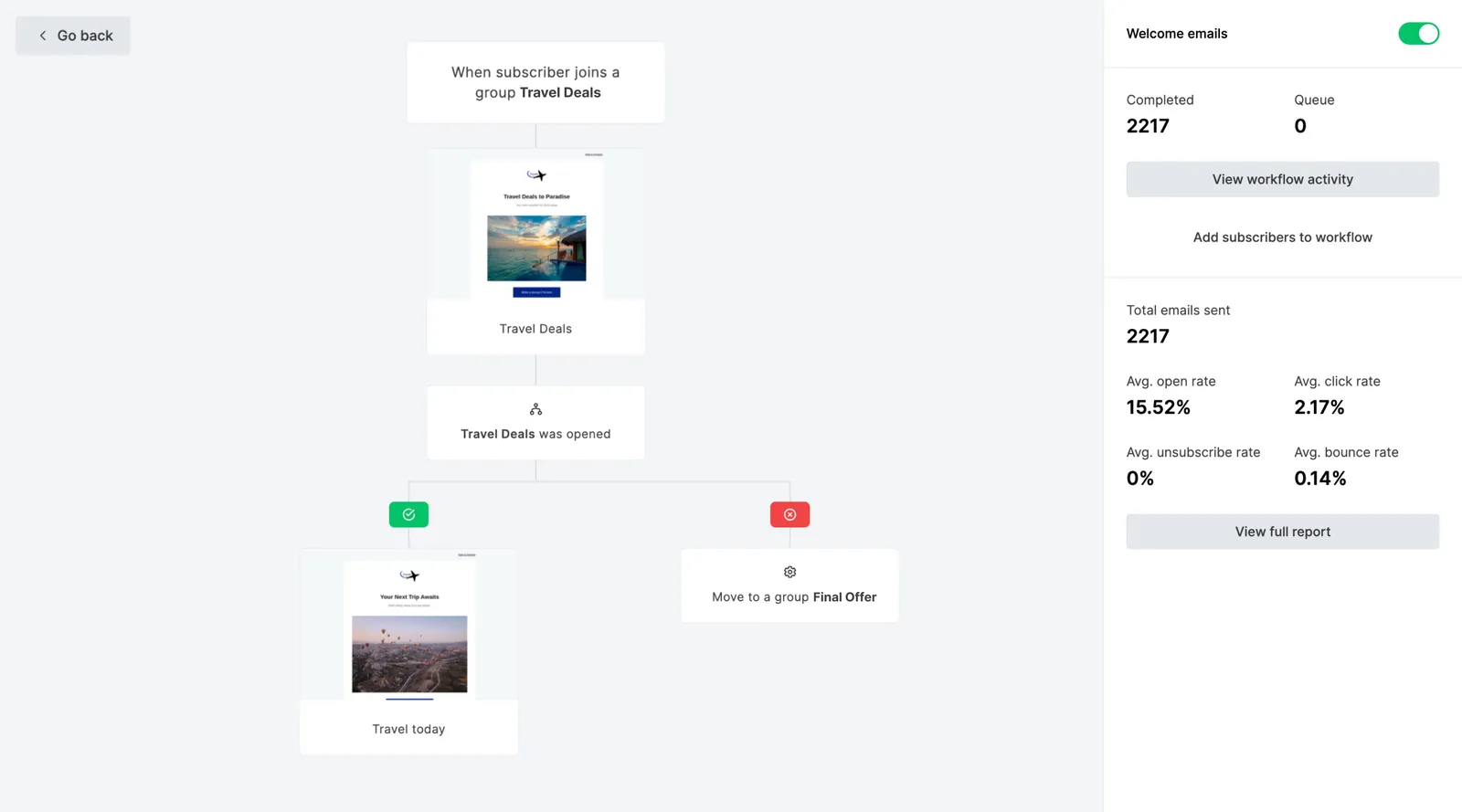
In MailerLite, welcome sequences are built in its visual automation builder, which also offers ready-made automation templates as a starting point. The trigger is a subscriber joining a group or signing up through a form; from there, you add emails and delays in the order described above. MailerLite’s free plan allows 3 active automations with up to 5 steps each, so on the free plan the three-email version of the sequence above is the more realistic fit; a full five-email flow with delays may exceed that step limit. Paid plans start with Comfort from $12/month, priced by subscriber count.
For a full walkthrough of creating your account, forms, and first automation, see our guide on getting started with MailerLite, or check current plan details on our MailerLite pricing page.
Build your welcome sequence visually
MailerLite's visual automation builder and templates make it straightforward to map out a welcome sequence and test it before switching it on.
Affiliate link: we may earn a commission. Disclosure
A quick checklist before you launch
- Every email has one clear purpose and one main call to action.
- The first email delivers what the signup form promised.
- Subject lines and preview text are specific and different from each other.
- Delays make sense for your audience and offer.
- Links, personalization fields, and discount codes all work.
- Subscribers move to your regular newsletter group when the sequence ends.
- You have tested it yourself on desktop and mobile.
A welcome sequence is never truly finished. Revisit it every few months, update outdated links or offers, and use what you learn to improve it. If you want broader context on how welcome emails fit with campaigns and other automations, our email marketing guide covers the full picture.
Frequently asked questions
How many emails should a welcome sequence have?
Three to five is a good range for most small businesses and creators. Fewer than three rarely leaves room to both introduce yourself and make an offer; more than five risks overwhelming someone who has only just joined. Start small and add emails once you see where people drop off.
Should new subscribers also get my regular newsletter during the sequence?
Ideally not at the same time. Overlapping emails can feel like a flood. Many tools let you hold new subscribers out of campaigns until the sequence finishes, for example by adding them to a separate group at the end of the automation. If that is not practical, keep the sequence short.
Can I use a welcome sequence without a lead magnet?
Yes. The first email simply confirms what they signed up for and when to expect it, and the rest of the sequence introduces your best content, your story, and your offer.
Keep reading
Email automation
Email List Segmentation: Groups, Segments, Fields and Tags
How groups, segments, fields, and tags differ, practical segment ideas for shops, creators, and service businesses, and how to avoid over-segmenting.
6 min read
Email marketing basics
How to Build an Email List the Right Way
A practical, consent-first guide to growing an email list with lead magnets, well-placed signup forms, double opt-in, and plain-English privacy rules.
8 min read
Email marketing tools
Getting Started with MailerLite: A Beginner’s Setup Guide
A step-by-step beginner’s guide to MailerLite: create your account, set up your audience, build a signup form, and send your first campaign.
6 min read